 Clear
ClearFree and open source · From ClearFrame
Observatory
Inspect MCP servers, keep local evidence, and continue in ClearFrame CLI or Mac.
One command. No account.
Scan a configured MCP server or try the included example. All Observatory checks, local history, reports, and CI are MIT licensed.
npx -y @kryptosai/mcp-observatory@latestThen run mcp-observatory dashboard to review locally, or mcp-observatory clearframe to prepare an agent task. ClearFrame has its own account and usage terms; Observatory works independently.
MCP Safety Index
Search published MCP checks and inspect what passed, failed, or could not be tested.
Loading published server checks…
A check is evidence from a particular scan, not a security certification. Review the scan date, findings, and untested checks before deciding to connect.
Your release evidence
My scans
See the latest result for your targets and the history available on your account.
Add evidence
Check a server. Keep the receipt.
Run a hosted check on a public endpoint, or upload a scan you ran on your machine.
Hosted scan
Check a public MCP endpoint
For public HTTP or HTTPS endpoints you are authorized to test. For local servers or endpoints that need credentials, use the local CLI in Setup.
Local receipt
Upload a JSON scan receipt
Choose a run artifact produced by the Observatory CLI. Uploading saves it to your current ClearFrame account.
Local tools, connected evidence
Start with a local scan.
The open-source Observatory CLI keeps its package name. Its checks are now part of the ClearFrame workflow.
Run the CLI
From your project folder, open Terminal or PowerShell. The CLI requires Node.js 20 or later and npm; it offers an included example when no server is configured.
npx -y @kryptosai/mcp-observatory@latestReview locally. Continue in ClearFrame.
Open a free local dashboard without an account or upload. Prepare a reviewable task for ClearFrame CLI or paste it into a new Mac chat with your project open. Task preparation does not start inference.
npx -y @kryptosai/mcp-observatory@latest dashboardnpx -y @kryptosai/mcp-observatory@latest clearframeAdd checks to CI
Generate a local CI workflow from your MCP server repository. Review its server startup command and generated files before committing them.
npx -y @kryptosai/mcp-observatory@latest setup-ci --allExisting Observatory CLI cloud and hosted CI accounts
The current CLI cloud sign-in uses your previous Observatory GitHub account. These commands send results to that account; they do not connect or migrate your ClearFrame account. To save a local receipt in ClearFrame, use Upload receipt above.
npx -y @kryptosai/mcp-observatory@latest cloud uploadLocal CI is free. Legacy hosted CI uses the existing account and repository credential. It is optional; use the local dashboard for account-free history.
npx -y @kryptosai/mcp-observatory@latest setup-ci --all --cloudSee sample reports, investigate request failures, compare releases and control what gets collected.
Open the illustrated guide →Observatory · A ClearFrame product
Get more from every MCP check.
Find a workflow, inspect an illustrated example and follow the next step. Local CLI checks are free and open source; hosted access follows your ClearFrame account.
Real screens. Sample data. Screenshots use fictional evidence, with no customer conversations or credentials. Local usage review runs on your machine; it does not upload conversations to ClearFrame.
11 workflows
Start here
Run your first scan
Open a terminal in your project. Try the bundled example first, then test your own startup command or target configuration. scan discovers configured servers; scan deep also invokes eligible tools. Only scan servers you are authorized to run.
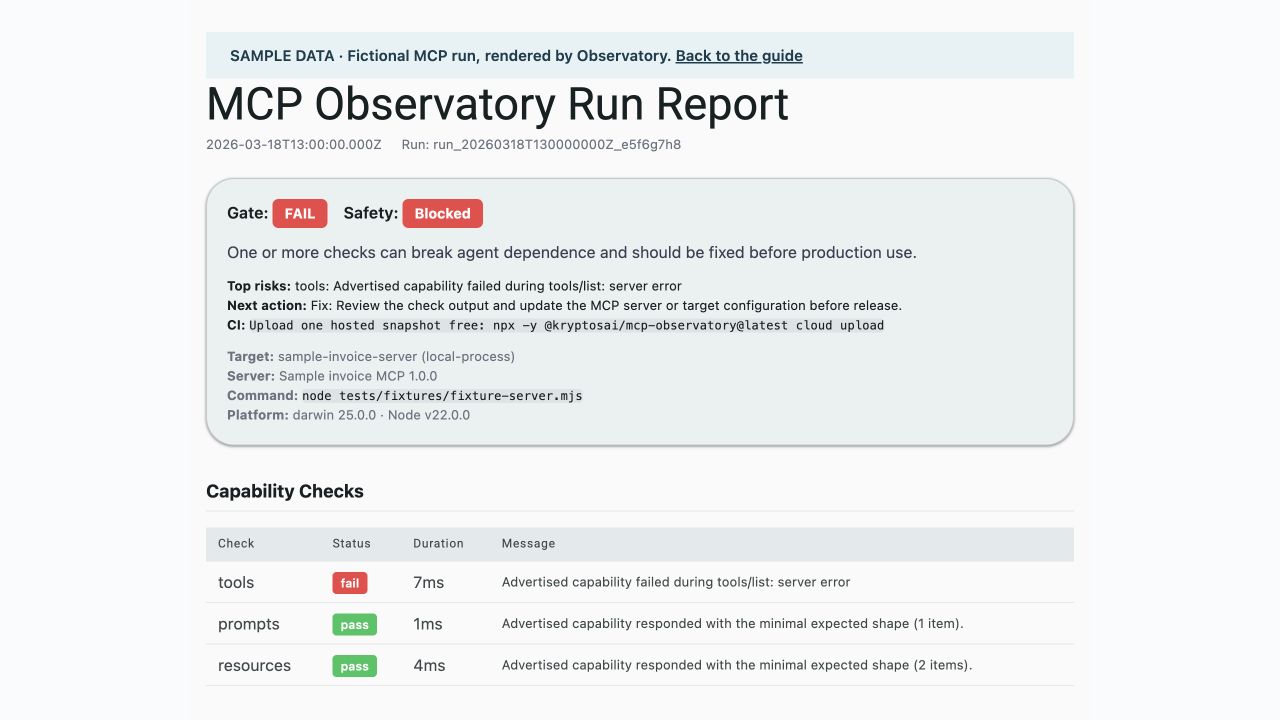
Commands for this workflow
Requires Node.js 20+. Replace example paths and commands with your own. Commands ending in --help explain options without starting a server.
npx -y @kryptosai/mcp-observatory@latest demo --examplenpx -y @kryptosai/mcp-observatory@latest test --target target.jsonnpx -y @kryptosai/mcp-observatory@latest scannpx -y @kryptosai/mcp-observatory@latest scan deepnpx -y @kryptosai/mcp-observatory@latest score --helpRead the failing check, its evidence and suggested fix. A successful connection is not proof that every tool works.
Free local tools
Understand and share the evidence
The gate tells you whether configured checks passed. A partial or unsupported check leaves a coverage gap. Scores summarize evidence; inspect the checks before making a release decision. Save JSON for automation, HTML for people, SARIF for code scanning, and Markdown or JUnit for CI.
Commands for this workflow
Requires Node.js 20+. Replace example paths and commands with your own. Commands ending in --help explain options without starting a server.
npx -y @kryptosai/mcp-observatory@latest test --helpnpx -y @kryptosai/mcp-observatory@latest badge --helpnpx -y @kryptosai/mcp-observatory@latest enterprise-report --helpnpx -y @kryptosai/mcp-observatory@latest ci-report --helpnpx -y @kryptosai/mcp-observatory@latest receipt --helpKeep the original receipt. Use enterprise-report for a local report across saved runs; it does not require a paid account.
Free local tools
Catch changes before a release
Save a passing baseline, then compare a later run. diff explains regressions and schema changes. Permission-change gates can block witnessed widening or queue unsupported changes for review. A lock file snapshots the advertised contract.
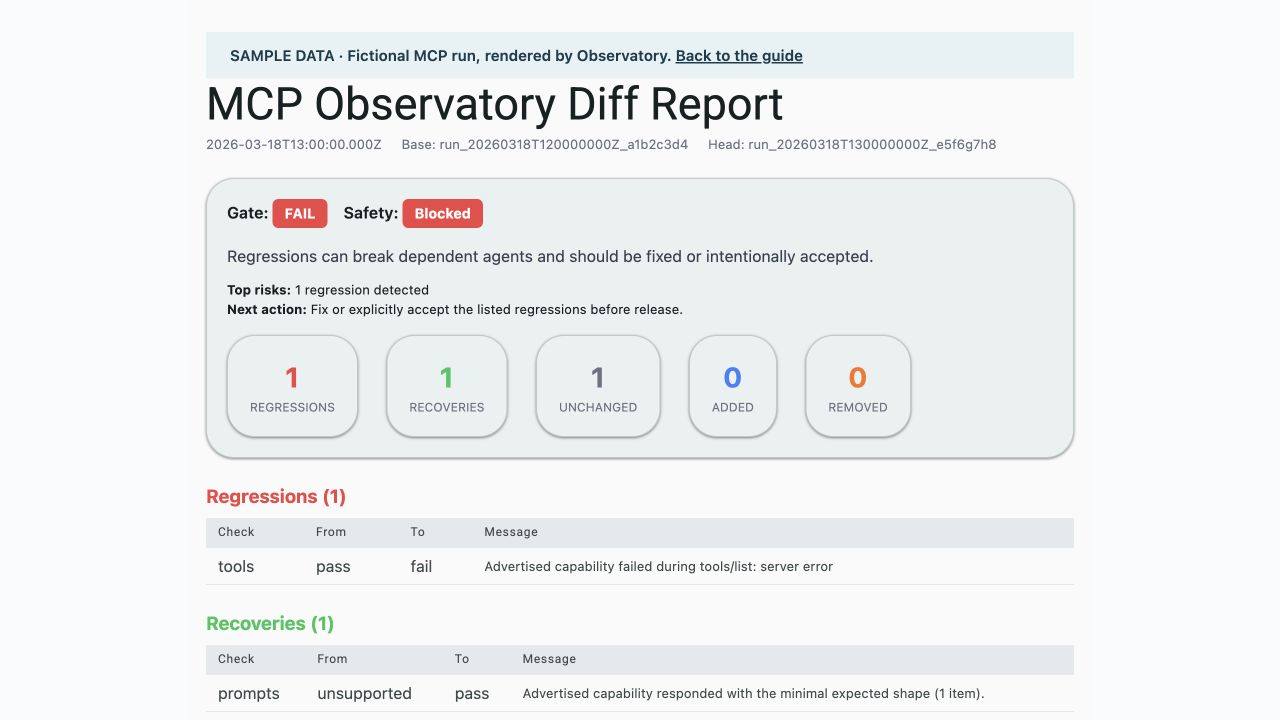
Commands for this workflow
Requires Node.js 20+. Replace example paths and commands with your own. Commands ending in --help explain options without starting a server.
npx -y @kryptosai/mcp-observatory@latest diff base.json head.json --format html --output diff.htmlnpx -y @kryptosai/mcp-observatory@latest diff base.json head.json --fail-on-permission-delta reviewnpx -y @kryptosai/mcp-observatory@latest lock --helpnpx -y @kryptosai/mcp-observatory@latest lock verify --helpFix the changed contract or explicitly review it before updating your baseline. Unsupported schemas are review leads, not a proven permission expansion.
Free · local and opt-in
Investigate “I asked X, got Y”
Instrument your server with observeTool and UsageStore. Correlate tool calls with an explicitly supplied request context. Server-side evidence includes calls, allowed arguments, errors and latency. The original conversation stays invisible unless the user deliberately shares it; a model summary is labeled as a proxy.
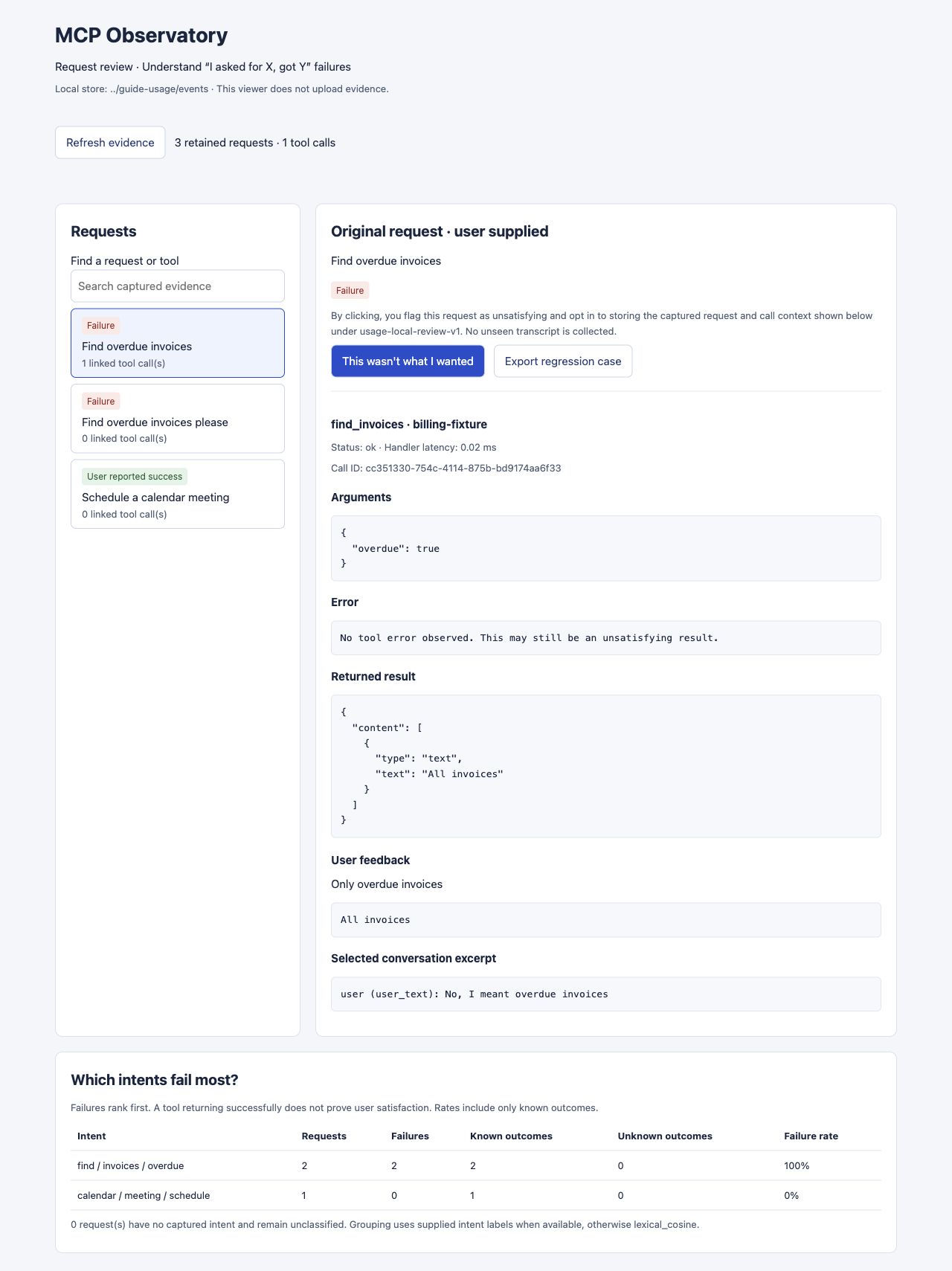
Commands for this workflow
Requires Node.js 20+. Replace example paths and commands with your own. Commands ending in --help explain options without starting a server.
npx -y @kryptosai/mcp-observatory@latest usage review --dir .mcp-observatory/usagenpx -y @kryptosai/mcp-observatory@latest usage feedback-templatenpx -y @kryptosai/mcp-observatory@latest usage analyze --dir .mcp-observatory/usagenpx -y @kryptosai/mcp-observatory@latest usage export --helpOpen a request and flag “This wasn’t what I wanted” in one step. Review linked calls and group requests by intent. Unknown outcomes stay separate from confirmed failures. Export a regression case, then define its expected-outcome assertion.
Free · advisory
Review source, packages and server combinations
source-audit inspects bounded JS/TS patterns without executing the project. package-check reviews package-name similarity without launching the supplied command. toxic-flow reviews saved tool inventories across servers. These are review leads; incomplete coverage exits 2.
Commands for this workflow
Requires Node.js 20+. Replace example paths and commands with your own. Commands ending in --help explain options without starting a server.
npx -y @kryptosai/mcp-observatory@latest source-audit ./src --format jsonnpx -y @kryptosai/mcp-observatory@latest package-check --format json -- npx -y @modelcontextprotocol/server-filesystem .npx -y @kryptosai/mcp-observatory@latest toxic-flow base.json head.json --format jsonnpx -y @kryptosai/mcp-observatory@latest skill-scan --helpRead the coverage limits and verify a finding in context. For toxic-flow, use snapshots from distinct servers; two versions of the same target are not a cross-server inventory.
Local CI is free
Keep checks running in CI
Generate a GitHub workflow for a known server command. --sarif adds GitHub Code Scanning output. --doctor checks the adoption kit. Local CI runs for free. Save its JSON receipt into ClearFrame with Run scan. Existing CLI hosted CI uses a separate previous Observatory account, as explained in Setup.
Commands for this workflow
Requires Node.js 20+. Replace example paths and commands with your own. Commands ending in --help explain options without starting a server.
npx -y @kryptosai/mcp-observatory@latest setup-ci --all --command "node server.mjs" --sarifnpx -y @kryptosai/mcp-observatory@latest setup-ci --doctornpx -y @kryptosai/mcp-observatory@latest init-ci --helpnpx -y @kryptosai/mcp-observatory@latest ci-report --helpInspect the generated workflow, supply required server credentials as repository secrets, commit it and review the first CI result. Never paste secrets into screenshots or target files.
Free Observatory workflows
Review locally or save in ClearFrame
Run a local scan, then choose its JSON receipt in Run scan. Uploading saves it to your current ClearFrame account. My scans shows your latest results, account allowance and available history. All Observatory features are free. For account-free history and downloads, use the local dashboard. Hosted capacity and retention remain service limits; previous Observatory accounts remain separate.
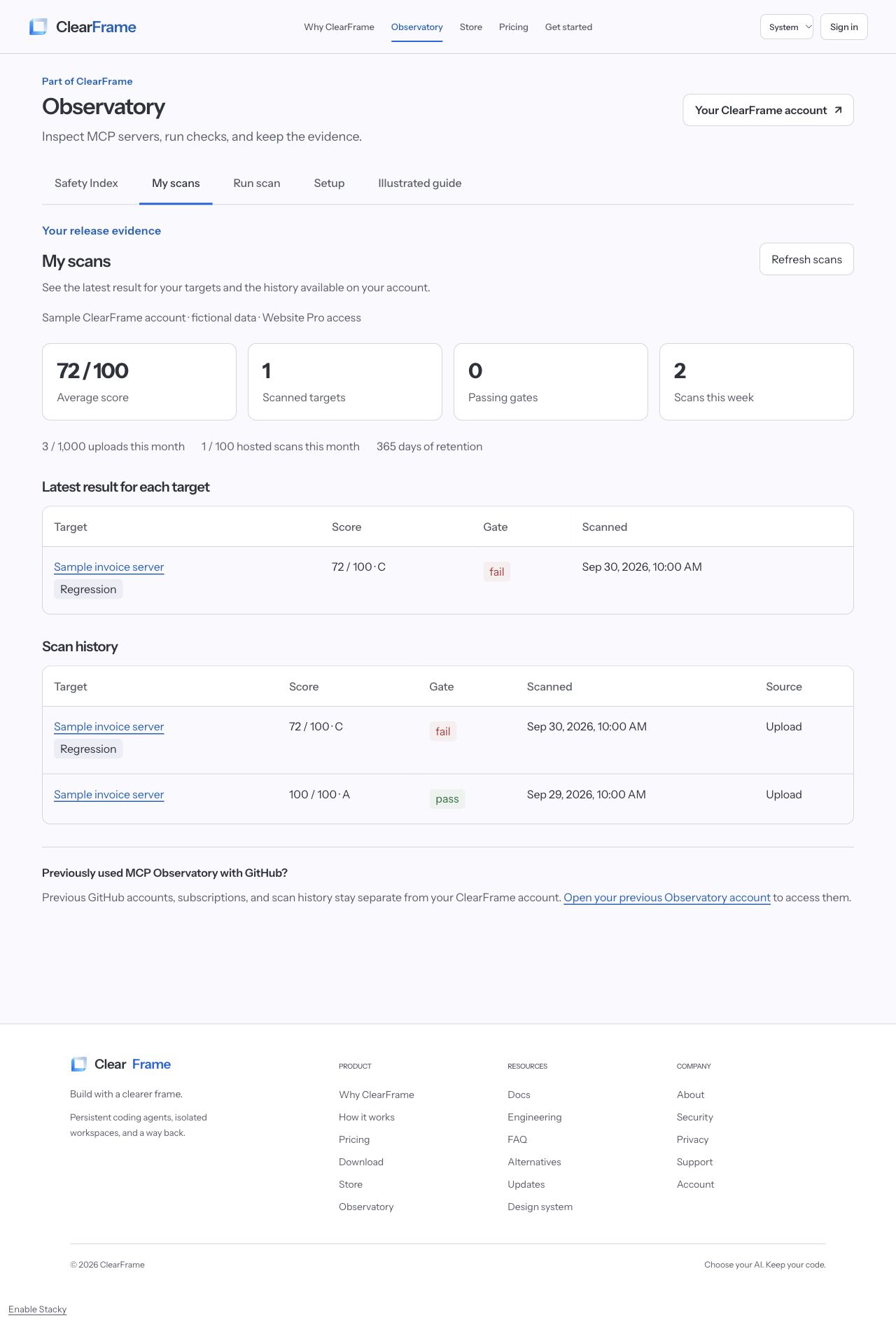
Commands for this workflow
Requires Node.js 20+. Replace example paths and commands with your own. Commands ending in --help explain options without starting a server.
npx -y @kryptosai/mcp-observatory@latest dashboardnpx -y @kryptosai/mcp-observatory@latest clearframeReview locally without signing in, or open Run scan to upload a local receipt or check an authorized public endpoint. In My scans, open a report and inspect the failing checks. A local-process server needs a local scan; hosted checks need a reachable public endpoint without credentials.
Free local tools
Record, replay and monitor
Record a server session as a cassette, replay it offline, and verify a live server against it. watch checks repeatedly and history shows local score trends. Recordings can contain server responses: use sample data first and inspect them before sharing.
Commands for this workflow
Requires Node.js 20+. Replace example paths and commands with your own. Commands ending in --help explain options without starting a server.
npx -y @kryptosai/mcp-observatory@latest record --helpnpx -y @kryptosai/mcp-observatory@latest replay --helpnpx -y @kryptosai/mcp-observatory@latest verify --helpnpx -y @kryptosai/mcp-observatory@latest watch --helpnpx -y @kryptosai/mcp-observatory@latest history --helpPin a cassette for regression work, review differences after server changes, and keep sensitive recordings in storage you control.
Free local tools
Audit and enforce a release decision
audit maps security findings to a profile; attack-sim runs safe attack-readiness checks. risk-graph combines saved receipts into a view of capability boundaries. enforce can generate a Seatbelt policy; wrap requires a passing local receipt, and protect rewrites client configuration to use that wrapper.
Commands for this workflow
Requires Node.js 20+. Replace example paths and commands with your own. Commands ending in --help explain options without starting a server.
npx -y @kryptosai/mcp-observatory@latest audit --helpnpx -y @kryptosai/mcp-observatory@latest attack-sim --helpnpx -y @kryptosai/mcp-observatory@latest risk-graph --helpnpx -y @kryptosai/mcp-observatory@latest enforce --helpnpx -y @kryptosai/mcp-observatory@latest wrap --helpnpx -y @kryptosai/mcp-observatory@latest protect --helpReview policies and save a copy of client configuration before enabling enforcement. A static receipt and inventory graph do not prove runtime safety. Inspect the command help before changing how your servers start.
Free local tools
Use Observatory with your agent
serve exposes Observatory as an MCP server so an agent can request checks. suggest recommends servers from your project stack; smithery integrates registry lookup and review. Recommendations and package similarity are starting points for verification, not endorsements.
Commands for this workflow
Requires Node.js 20+. Replace example paths and commands with your own. Commands ending in --help explain options without starting a server.
npx -y @kryptosai/mcp-observatory@latest serve --helpnpx -y @kryptosai/mcp-observatory@latest suggest --helpnpx -y @kryptosai/mcp-observatory@latest smithery --helpnpx -y @kryptosai/mcp-observatory@latest helpAdd Observatory to your MCP client using the documented configuration, then ask it to check a server before depending on its tools.
Your storage, your choice
Control what gets collected
Usage learning and product telemetry are separate. Usage capture defaults to minimal call metadata; allow argument fields explicitly and collect conversation context only with consent. Choose the UsageStore directory and retention. Keep local data on your own disk or encrypted volume; hosted uploads use the hosted service’s storage and retention.
Commands for this workflow
Requires Node.js 20+. Replace example paths and commands with your own. Commands ending in --help explain options without starting a server.
npx -y @kryptosai/mcp-observatory@latest usage prune --helpnpx -y @kryptosai/mcp-observatory@latest telemetry statusnpx -y @kryptosai/mcp-observatory@latest telemetry previewnpx -y @kryptosai/mcp-observatory@latest telemetry disableReview redacted evidence before sharing it. You can stop after a local scan. A telemetry opt-out does not delete hosted receipts or local usage records.
No matching workflows. Try “scan”, “feedback” or “privacy”, or clear the search.
Try the evidence
Sample receipts you can inspect
Download these fictional passing and failing receipts into the same folder, then try the diff workflow. Inspect sample receipts locally; upload your own reviewed receipt when you want to save it to ClearFrame.
For feedback and intent clustering, run the synthetic usage example in a source checkout after building it, then open usage review on its events directory.